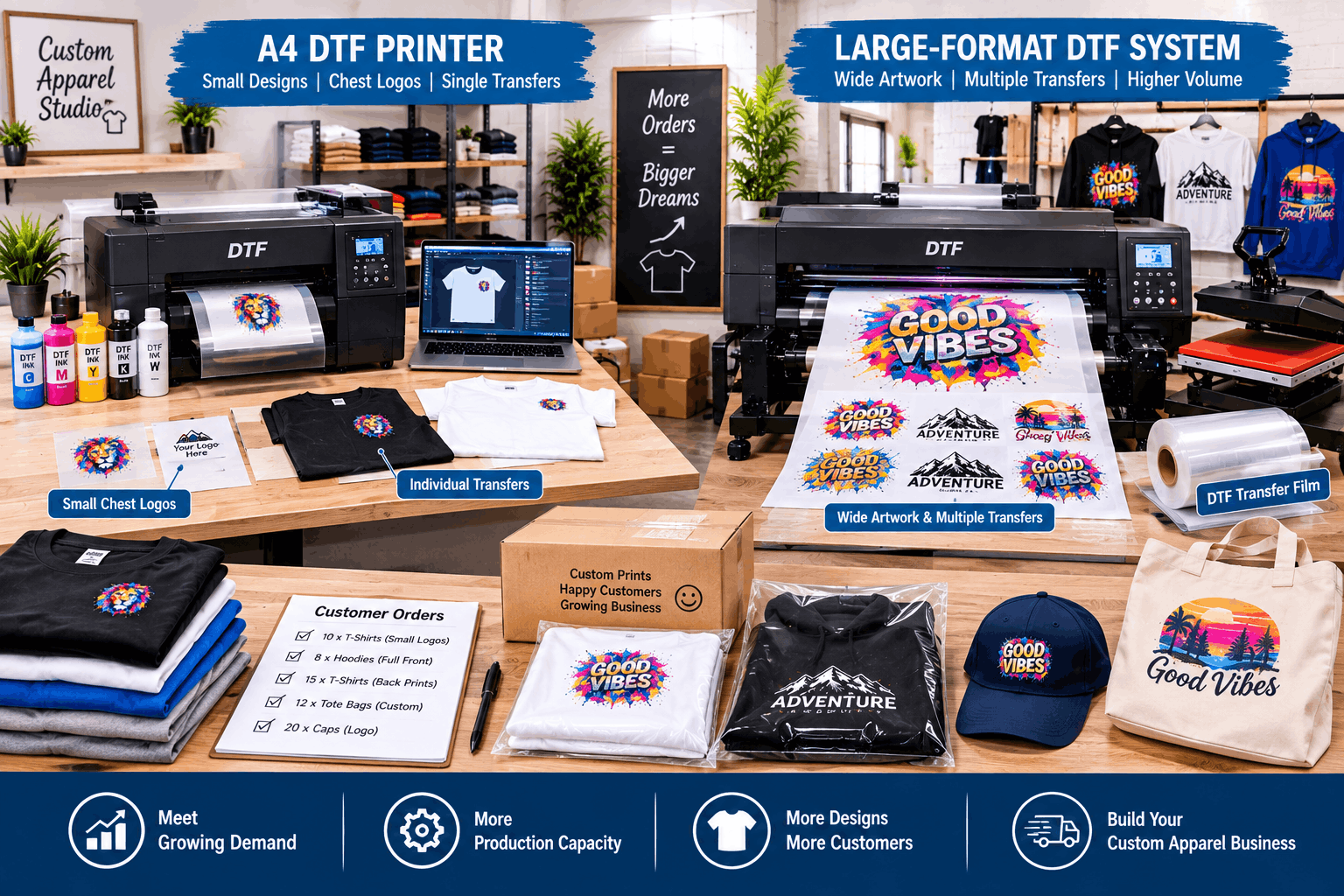
You should consider whether to upgrade an A4 DTF printer when its print width or production capacity starts limiting the orders your business can handle efficiently. Larger artwork, increasing order volume, repeated workflow bottlenecks, and longer production times can all indicate that your current setup is approaching its practical limits.
However, growth does not automatically mean an A4 printer has become unsuitable. The right time to upgrade depends on the products you sell and the type of demand your business receives.
Why Do Small Businesses Start With A4 DTF Printers?
A4 DTF equipment can make sense for a new or small custom printing business.
Its compact size can fit more easily into a home studio or small workshop. It can also support many smaller apparel applications without requiring the footprint of a larger production machine.
Typical jobs may include:
- small T-shirt graphics;
- chest logos;
- sleeve designs;
- names and numbers;
- children’s clothing;
- tote bag graphics;
- personalised short runs.
If these products represent most of your orders, moving to larger equipment may offer little immediate benefit.
Equipment should match actual production needs rather than business size alone.
When Does A4 Print Width Become a Limitation?
Print width becomes a problem when customers regularly request artwork that does not fit comfortably within the available printing area.
A small chest logo may work perfectly on an A4 system. A wide front or back design can create a different challenge.
If you repeatedly resize artwork simply because the printer cannot accommodate the intended dimensions, the machine may be limiting the products you can offer.
Track how often this happens.
An occasional oversized request may not justify new equipment. Frequent lost or modified orders deserve more attention.
Order Volume Can Signal the Need to Upgrade
A printer can still produce good-quality transfers while becoming too slow for the volume a business needs.
This distinction is important.
The question is not only, “Can this printer produce the job?”
It is also, “Can this printer produce enough of these jobs within the required time?”
As daily orders increase, a compact system may spend more hours running. The surrounding powdering, curing, pressing, and finishing stages can also become busier.
If production regularly extends beyond practical working hours, evaluate where the capacity problem begins.
Find the Real Workflow Bottleneck First
Buying a larger printer will not automatically solve every production delay.
The printer may not be the bottleneck.
For example, transfers could be printing quickly while one small heat press slows the entire production line. Limited curing capacity could create another delay.
Garment preparation, artwork approval, packaging, or order management can also restrict output.
Map the complete workflow:
Artwork → printing → powdering → curing → pressing → finishing → packaging
Then identify the stage where work consistently begins to queue.
Upgrade the part of the workflow that is actually restricting production.
When Larger Artwork Becomes Regular Business
A larger DTF setup becomes easier to justify when wide designs form a consistent part of customer demand.
For example, a clothing business may begin with small personalised graphics but later attract customers requesting larger back prints, oversized fashion graphics, or broader uniform designs.
At that stage, print width becomes a business capability rather than simply a technical specification.
Before changing equipment, review recent orders.
How many required larger artwork?
How many were resized?
How many could not be accepted?
These practical questions provide more useful guidance than upgrading simply because a larger machine exists.
When an A4 DTF Printer Still Makes Sense
Compact equipment can remain useful even as a business grows.
If your main products continue to use smaller transfers, this A4 DTF printer range can remain relevant to businesses that value a compact production footprint and do not regularly require larger print dimensions.
An existing A4 printer may also remain useful after larger equipment is added.
For example, a shop could reserve the compact machine for small logos, personalised items, samples, or short jobs while the larger system handles wider designs.
Upgrading does not always mean replacing existing equipment.
Should You Upgrade Because Orders Are Increasing?
Higher sales alone are not enough to answer the question.
Look at whether the current equipment is preventing the business from fulfilling those sales efficiently.
If the printer has unused capacity during most working days, a larger machine may not solve a meaningful problem.
On the other hand, if print queues are constant and the machine regularly operates near its practical production limit, additional capacity may deserve consideration.
Also check whether demand is stable.
A short seasonal spike can create temporary pressure that does not necessarily justify a permanent equipment change.
Consider the Entire Cost of a Larger Setup
A larger printer can affect more than the equipment purchase itself.
It may require additional workspace, larger film supplies, different production furniture, more curing capacity, increased consumable storage, or changes to the way jobs move through the room.
The heat-press stage should also be reviewed.
If you plan to produce larger transfers, your existing press must be suitable for the intended applications.
Software and computer requirements may also differ depending on the new equipment.
Therefore, expansion should be planned as a workflow change rather than a printer-only purchase.
Is Your Workspace Ready for Larger Equipment?
Physical space can become a deciding factor.
An A4 printer may fit comfortably on a compact workbench. Larger production equipment can require more floor or bench space, along with additional room for film handling and maintenance access.
Measure the workspace before purchasing anything.
Consider:
- machine dimensions;
- film loading and output space;
- operator movement;
- curing equipment;
- heat-press clearance;
- ventilation requirements;
- consumable storage;
- maintenance access.
A larger machine placed in an overcrowded room can reduce efficiency instead of improving it.
Use Production Data to Guide the Decision
Simple records can make an upgrade decision much clearer.
Track the number of orders, transfer sizes, printing time, rejected jobs, production delays, and recurring bottlenecks.
You do not need a complicated analytics system.
Even a basic spreadsheet can reveal whether the same limitations appear repeatedly.
For example, if most jobs remain small and production finishes comfortably within available hours, an A4 system may still fit the business.
If wide designs are frequently requested and printing capacity is consistently under pressure, larger equipment becomes more relevant.
Upgrade for a Specific Production Need
The best reason to expand a DTF setup is a clear production requirement.
That requirement might be wider artwork, higher sustained volume, shorter turnaround expectations, or a product range that no longer fits the existing equipment.
Avoid upgrading solely because the business has reached a particular age or because a larger printer appears more professional.
An A4 DTF printer can remain productive when its dimensions and capacity continue to match customer orders.
When those limits repeatedly restrict sales or workflow efficiency, moving to a larger setup becomes a practical scaling decision. The goal is not simply to own bigger equipment. It is to build production capacity that matches the next stage of the business.